
fylm.ai
Freemium
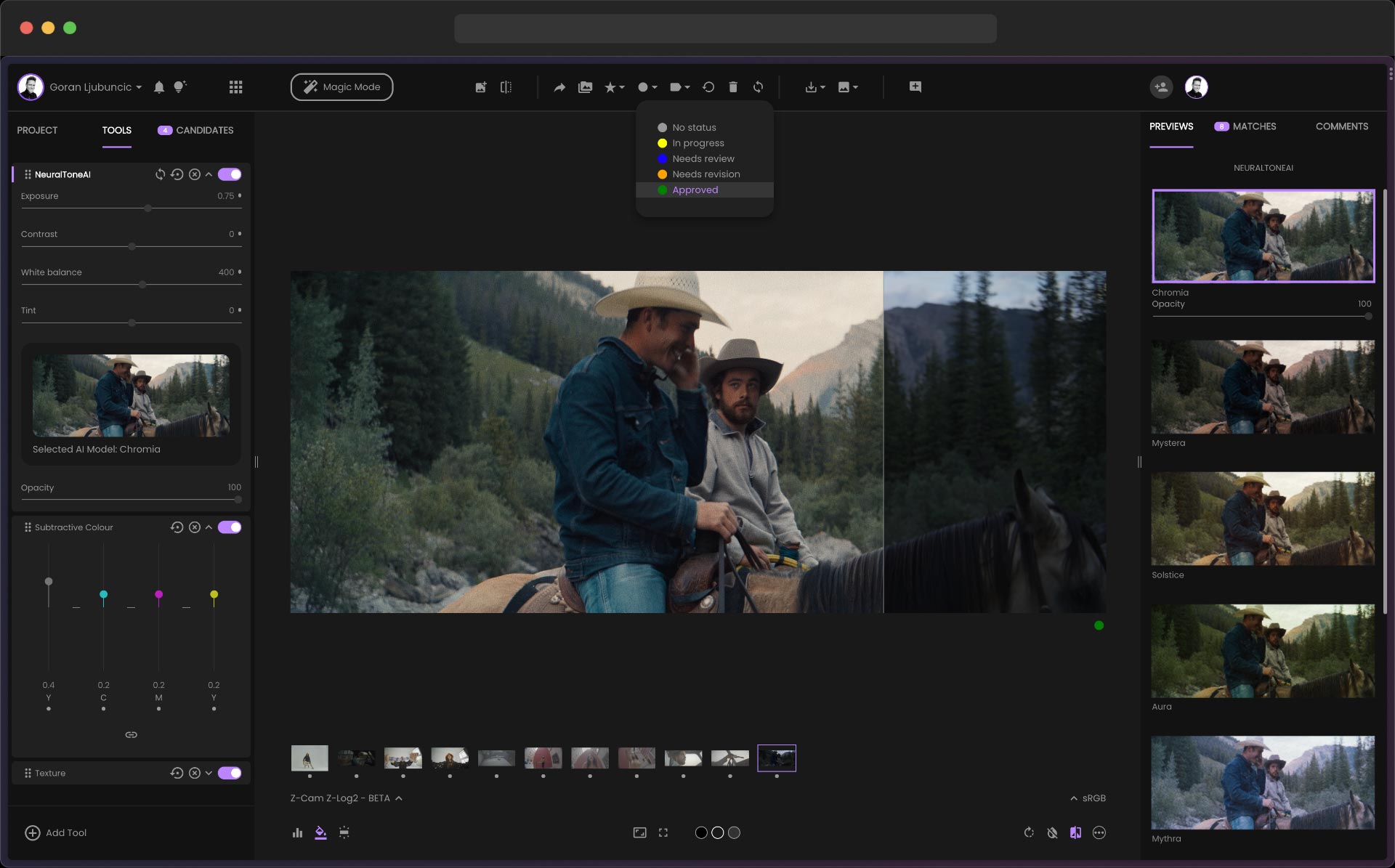
Create colour grades and LUTs in a browser using AI-assisted film emulation tools, export to Premiere Pro or other software, and collaborate with real-time team feedback.
About
fylm.ai is a browser-based tool for color grading and LUT creation. It runs in Image Editing workflows for filmmakers, photographers, and video teams.
You upload footage or stills. The AI suggests grades, or you work manually with pro-level controls. Everything stays in the cloud.
It fits remote teams and solo creators who want film looks without heavy software. It is a poor fit for those who need full editing or offline work.
Open it if you want guided color grading in a browser. Skip it if you need a full editor or work offline.
Who fylm.ai is best for
You get the most from it when your work matches these situations.
- Beginners to color grading who want guided AI assistance: Magic Mode walks you through 12 steps. You learn without drowning in scopes and curves.
- Editors who need occasional professional grading without heavy software investment: You get ACES color management and print film emulations. No download or hardware upgrade needed.
- Remote collaborators needing client review features: You comment and approve inside the app. Your director sees status without extra tools.
- Hybrid photographer/videographers needing consistent looks across both: You export LUTs and Adobe XMP profiles. One grade travels to Lightroom and Premiere.
- Premiere Pro editors wanting cloud grading with direct timeline sync: The Pro plan extension pushes your timeline up and pulls grades back. No LUT round-trip.
- Solo creators needing AI-assisted look creation and LUT workflows: The Lite tier gives you NeuralToneAI and export options. You test looks before you commit.
- Teams requiring comment threads, client sharing, and approval workflows: Status tracking and in-app comments keep scattered teams aligned.
- Photographers needing quick LUT generation: You build looks from reference images or film stocks. Export goes to Capture One, Photoshop, or Affinity.
- Filmmakers wanting film emulation without plugin costs: NeuralFilmAI and subtractive color models mimic film behavior. No separate purchase.
- Producers managing distributed teams who need remote look approval: You review and sign off from anywhere. Project heads test looks before handoff.
Best things about fylm.ai
These parts stay useful after you have used it for real work.
- Magic Mode for guided grading: It breaks color work into 12 clear steps. You finish a grade without guessing which slider to touch.
- AI Color Extract from reference images: You pull a look from any photo you like. The match is not perfect, but it gives you a starting point.
- Browser-based with no installation: You open Chrome and start. No version updates, no operating system limits.
- Premiere Pro extension for timeline sync: One click uploads your cut. One click brings grades back. You skip the export-LUT-import dance.
- Smooth, dark interface: Your image sits front and center. Opacity sliders do not lag. The workspace gets out of your way.
- Multiple export formats: You get 3D LUTs, XMP profiles, and Capture One styles. Your grade moves wherever you edit.
How you use fylm.ai
The workflow is built around upload, grade, and export.
- Create a project and upload your footage or stills.
- Choose your input camera and output display.
- Pick Magic Mode for guided AI help, or AI Color Extract to match a reference image.
- Adjust manually with scopes, curves, and film emulations if needed.
- Export as LUT, XMP, or direct sync to Premiere Pro.
Why you should ignore it
Skip it when these limits block your work.
- Slow browser performance: Heavy footage strains the cloud. Your connection speed controls how fast it responds.
- No standalone editing tools: You cannot crop, transform, or do basic fixes. You still need Lightroom or Photoshop for that.
- Limited free tier: Three projects and 1GB storage tests the idea, not a real job. You hit the wall fast.
- Premiere extension is paywalled: Free and Lite plans do not get the one-click timeline sync. You export LUTs manually instead.
- Color Match can miss: Some tests show unusable results with different lighting. You still need to check and tweak.
- No offline access: You need solid internet. On-set work without connectivity is not an option.