
Dreamwave
Paid
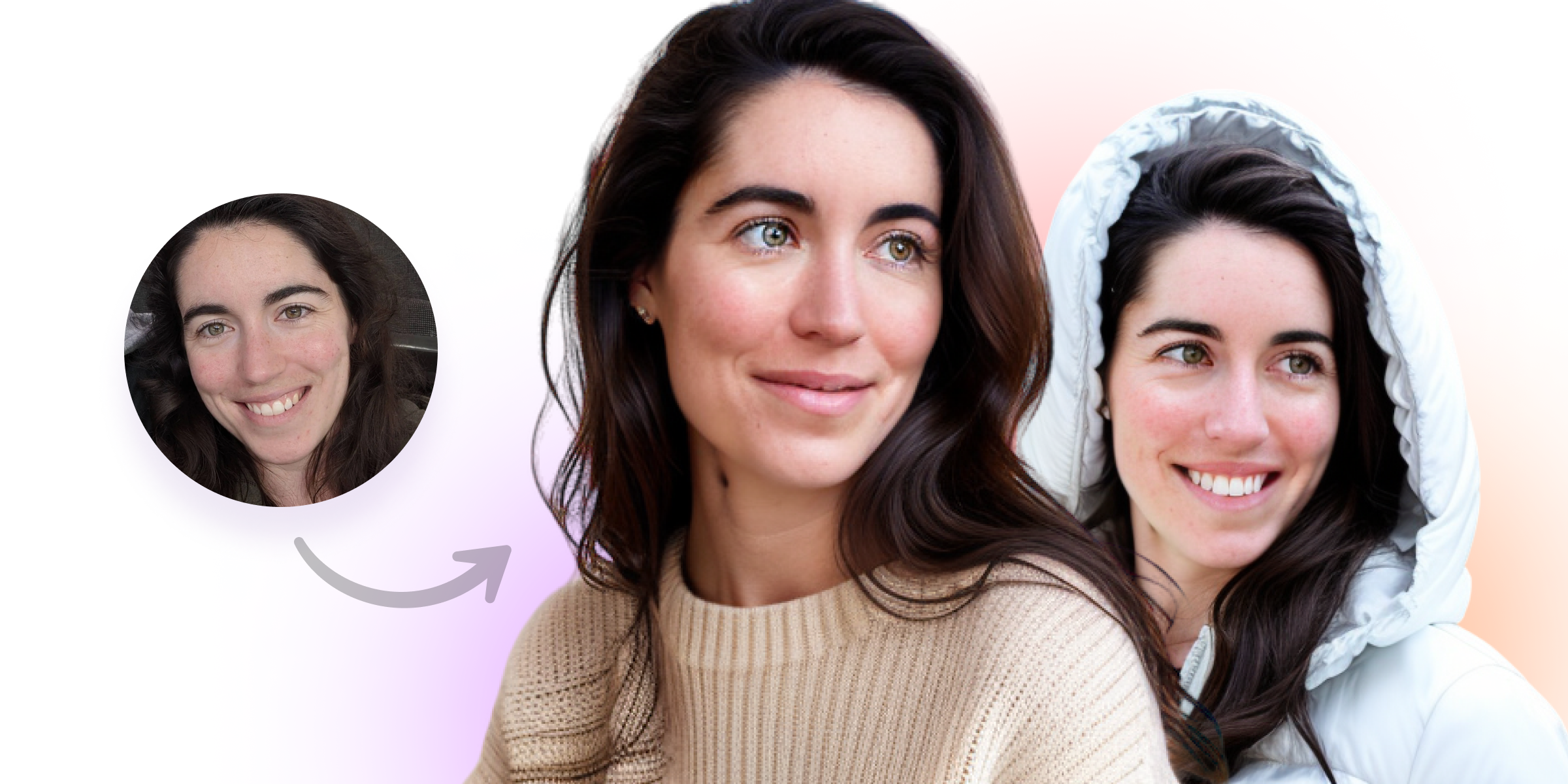
Upload a selfie to receive a gallery of professional headshots, with options to edit outfits and backgrounds, for personal use, company directories, or event photobooths.
About
Dreamwave is an AI photograph platform for headshots. You upload selfies. It gives you a gallery of processed portraits.
You can edit after generation. Change outfits, swap backgrounds, fix teeth, remove blemishes.
It was built by researchers from MIT, Google DeepMind, OpenAI, Meta, and SpaceX. The company reports 25+ million portraits delivered.
Open it if you need many headshot options fast and do not mind AI-smooth skin. Skip it if you need true photorealism or refund protection.
Who Dreamwave is best for
You get the most from it when these situations match yours.
- Users who prefer clean, solid background headshots: The solid color backdrops pop with strong contrast. The photorealistic backdrops fall short, so stick to simple.
- Those wanting good teeth/face touchup options: The auto-improve teeth feature actually works. The eye improvement tool does not.
- People who value straightforward onboarding: No forms for eye color, ethnicity, or body type. Pick styles, upload photos, wait.
- Users who prioritize post-generation editing flexibility: Editor lets you fix teeth, remove blemishes, swap backgrounds without Photoshop.
- Those needing quantity over perfect realism: You get around 200 images. Many will be near-misses. You curate the usable ones.
- Users comparing against free tools: Dreamwave outperforms significantly versus free alternatives. The free tier here forces a 16-day wait.
- Users who need maximum number of options: Paid tiers run 120 to 500 headshots. You trade quality for quantity.
- HR teams managing employee headshots at scale: Company-wide deployment with Workday, ADP, Rippling, BambooHR, Gusto integration. Automatic directory updates.
- Event organizers needing branded, downloadable portraits: AI photobooth captures lead contact info. Branded touchpoints, live slideshow walls, QR-based upload, branded microsite.
- Teams wanting bulk corporate portraits: Bulk pricing, automated reminders, style consistency across generations. Commercial usage rights included.
Best things about Dreamwave
These stand out after you run it.
- Generous output volume: You get 200 to 500 headshots depending on tier. This matters when you need options to sort through.
- Built-in editor with real fixes: Fix teeth, remove blemishes, change backgrounds with text prompts. You stay in one tool.
- Minimal onboarding friction: Upload starts fast. No lengthy attribute forms. The sidebar guidance helps.
- Team and event tools: HRIS integration, automated reminders, QR-based upload, branded microsites. The logistics get easier.
- Fast turnaround: Results come in about 1 to 2 hours. You skip the weeks-long photographer wait.
- Occasional deep discounts: 40% off promotions appear. Check timing if you are price-sensitive.
How you use Dreamwave
The path is short.
- Pick your styles and upload at least 5 photos.
- Pay and wait 1 to 2 hours for processing.
- Review your gallery and curate the usable shots.
- Use the editor to fix teeth, remove blemishes, or swap backgrounds.
- Download your final selections.
Why you should ignore it
Skip it when these limits matter to you.
- Photorealism is your priority: Images have filtered, overly smooth quality. Skin artifacts, plasticky finish, blank expressions are common. The more you look, the more artificial they feel.
- You want refund protection: All sales are final. No money-back guarantee. Cancellations face strict terms.
- You hate hidden pricing: Costs stay hidden until after photo upload. This kills the purchase for some users.
- You need fast free results: Free tier forces a 16-day wait. Practically pushes you to paid.
- You want clear status updates: No progress bar during processing. No dashboard redirect. Gallery shows cramped single-row navigation.