
BotPenguin
Freemium
Build AI agents, chatbots, and voice agents without code, then deploy them across messaging apps, social platforms, phone, and websites to automate customer conversations.
About
BotPenguin is a no-code platform for building chatbots and AI agents. You use it to automate conversations across WhatsApp, Instagram, Facebook, websites, and more.
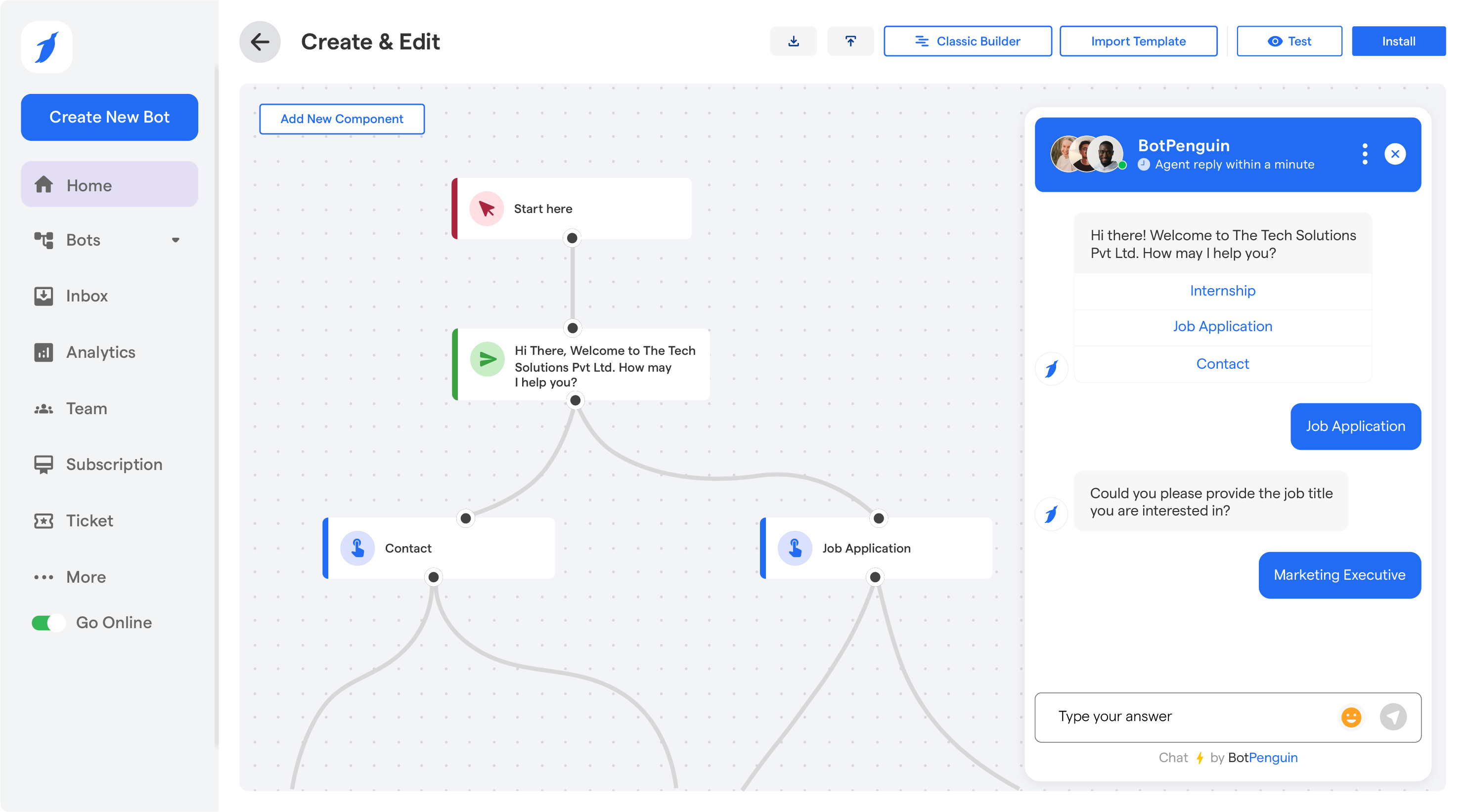
You drag and drop conversation flows, connect your channels, and let the bot handle routine questions. When the bot gets stuck, it hands off to a live agent.
It fits customer support, lead capture, and appointment booking. It is not for building deep AI research tools or natural dialogue that reads context across days.
Open it if you need quick chatbot deployment across messaging channels. Skip it if you need AI that truly understands complex, multi-turn sales conversations.
Who BotPenguin is best for
These are the jobs it actually handles well.
- Small businesses needing WhatsApp marketing automation: You get broadcast messaging and catalog flows. Support staff walk you through Meta API setup by name.
- Teams without technical resources: You build and deploy without writing code. Onboarding gets praise as "one of the best" with quick, direct responses.
- Users prioritizing hand-holding support: Named staff like Nandini and Shivansh stay with you through setup and technical issues.
- Small businesses wanting cheap FAQ deflection: The free tier gives 1,000 messages to test one narrow use case before you pay.
- SMBs running WhatsApp broadcasts: You send bulk messages and automate shop catalogs. Meta conversation fees are extra and can surprise you.
- Agencies wanting a white-label bot builder: You rebrand the platform and resell to clients. The option is built in, not an afterthought.
- Teams needing explicit handoff rules: You set when the bot stops and a human takes over. Each channel keeps its own rules for buttons and consent.
- Users who want to compare LLM providers: On higher plans you switch between Gemini, Claude, LLaMA, DeepSeek, and ChatGPT without changing platforms.
- Businesses automating lead capture: You catch leads from websites and social, then route them to your CRM or calendar.
- Teams needing live chat handoff: Complex queries escalate to humans through a unified inbox with multi-agent support.
Best things about BotPenguin
These are the parts you keep using after the first week.
- Truly no-code interface: You build flows by dragging and connecting blocks. No engineering team needed to get a working bot.
- Generous free tier: You get 1,000 messages and one bot with AI knowledge base included. Enough to prove value before spending.
- Named, responsive support staff: You talk to real people who know your setup. They walk you through Meta approvals and custom integrations.
- Strong WhatsApp integration: You handle API headaches with help from the team, then run broadcasts and catalog automation that work.
- Unified inbox with live handoff: You see all conversations in one place and pull in a human when the bot stalls.
- White-label for agencies: You resell the service under your brand. Clients never see BotPenguin.
Why you should ignore it
These are the real limits you hit.
- Flow-first design: You build keyword trees and decision branches, not natural conversations. The AI feels bolted on, not native.
- Message budget burns fast: Your 1,000 free messages mix user chats and AI answers. Production use eats through them quickly.
- Instagram automation is basic: You get comment-to-DM triggers and keyword replies, not true dialogue for hesitant high-ticket leads.
- Interface needs polish: Building flows works, but customization feels rougher than competitors. You fight the UI more than you should.
- Pricing gaps: You jump from $99/month to $990/month with no middle ground shown. Enterprise details stay vague.
- Token consumption concerns: Complex builds use up your AI message limit faster than expected. You watch the meter closely.
How you use BotPenguin
The path is straightforward.
- Sign up for the free tier and pick your channels.
- Use the visual builder to drag conversation flows and set handoff rules.
- Connect your AI knowledge base or pick your LLM provider on paid plans.
- Deploy to WhatsApp, Instagram, your website, or other channels.
- Monitor conversations in the unified inbox and adjust flows as real messages come in.