
Blaze
Paid
Plan marketing campaigns, create and publish content across channels, and track performance with AI assistance, either self-managed or with a human team running the full program.
About
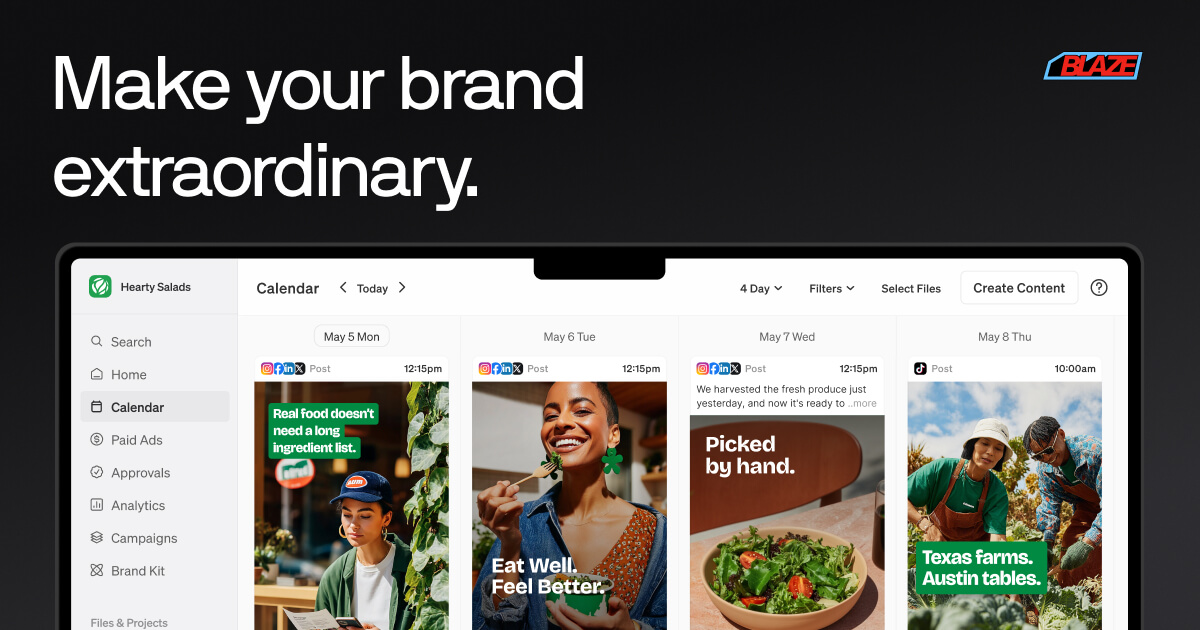
Blaze is a marketing tool that generates content and posts it for you. It handles blogs, social posts, emails, and ads in one place.
You feed it your website or brand samples. It learns your voice and builds a content calendar. You review, edit, and approve before anything goes live.
It sits in the marketing category. It is built for small businesses, not enterprise teams.
Open it if you need consistent content without hiring. Skip it if you need video editing or complex campaign management.
Who Blaze is best for
These are the situations where it actually saves time.
- Small service businesses with no time: Plumbers, window cleaners, anyone booked solid who needs social presence without daily work.
- Solo operators and coaches: You need brand visibility but cannot spend hours on content creation each week.
- Budgets under $1,000 per month: You cannot justify agency fees but need more than free tools.
- Users who will check the work: You are comfortable with 15-20 minutes weekly review, not zero-touch automation.
- Social media managers with multiple clients: You need one place to draft, review, and schedule across accounts.
- Marketing teams without dedicated writers: You need quick drafts that match your brand voice.
- Solopreneurs who need consistency: You cannot hire help but need to show up regularly online.
- Agencies willing to edit: You want AI first drafts that you shape before client delivery.
Best things about Blaze
These stand out after you have used it a few times.
- Calendar view rivals expensive schedulers: The interface feels like Hootsuite or Sprout Social. You see everything at once.
- Brand kit adds real control: Upload your writing samples. The output stops sounding generic.
- No prompts needed for basic work: Scrape your site, spend 20 minutes on setup, get a week of posts.
- Approval workflow keeps you in charge: Nothing posts without your sign-off. Push notifications help if you are mobile.
- Zapier connection extends reach: Hook it to 5,000 other apps if you need automated triggers.
How you use Blaze
The workflow is straightforward once you set it up.
- Connect your website or upload writing samples to build your brand voice.
- Review the generated content calendar and edit what does not sound like you.
- Approve posts and set your publishing schedule across channels.
- Check notifications weekly for items needing your sign-off.
Why you should ignore it
Skip it when these limits matter to you.
- No video at all: No editing, clip generation, or repurposing from long-form video. You will need another tool.
- Weekly review is mandatory: "Autopilot" oversells it. You cannot set and forget.
- Generic output if you rush: The brand kit needs real attention or you get AI sludge.
- Social scheduling is basic: You may still need Buffer or Hootsuite for serious calendar management.
- Credit system hurts video users: AI video costs 15 credits each. Forty videos eats your entire monthly allowance.
- Unclear AI models: Blaze does not tell you which models generate your content and images.